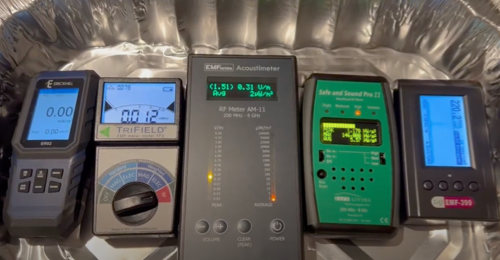
The short answer is no. While smartphone apps can detect some magnetic fields using your phone’s built-in compass sensor, they cannot measure the types of EMF radiation most people are concerned about.
Phone apps cannot detect:
- WiFi and wireless radiation (RF)
- Electric fields from wiring
- AC magnetic fields from appliances and power lines
- Dirty electricity
If you’re serious about measuring EMF in your home, you need a proper meter. Our guide to choosing the right EMF detector and meter explains your options.
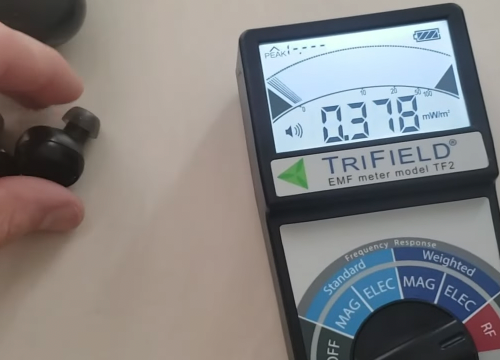
Here’s why phone apps fall short and when you actually need dedicated equipment.
How Smartphone EMF Apps Work
Before we discuss whether phone apps work, let’s understand the technology behind them.
The Magnetometer Sensor
Most modern smartphones have a built-in magnetometer sensor. This is the same sensor your phone uses for its digital compass in mapping apps. The magnetometer measures magnetic forces and helps your phone figure out which direction is north.
EMF detector apps use this existing magnetometer to measure magnetic field strength around your device. The apps show readings in units like microtesla (μT) or milligauss (mG) and display changes in the magnetic field as you move your phone around.
What the Apps Actually Measure
Here’s the critical limitation: smartphone magnetometers measure the Earth’s natural magnetic field, which is a static DC (direct current) field with no frequency or fluctuation.
This is fundamentally different from the AC (alternating current) magnetic fields produced by your home’s electrical wiring, appliances, and power lines. AC fields operate at 60 Hz in North America (50 Hz in Europe), which is what dedicated EMF meters are designed to detect.
In simple terms: Your phone’s sensor is built to find north for navigation, not to measure the electromagnetic radiation from your WiFi router or microwave oven.
What Phone Apps Can Detect
Despite their limits, smartphone EMF apps can detect certain things:
1. Earth’s Natural Magnetic Field
By default, EMF apps show you Earth’s natural magnetic field at your location, which should be between 25-65μT. This is completely normal and harmless background radiation.
2. Metal Objects
Your phone can detect the presence of metals like iron, steel, and nickel that have their own magnetic field. You can only detect these ferromagnetic materials—not metals like gold and copper.
This is why some people use phone apps as basic metal detectors or stud finders, though they don’t work very well.
3. Large Electrical Devices (Very Close Range)
If you hold your phone extremely close to a powerful electrical device, you might see the readings spike. However, the sensor only works within about 6 inches of the object, so it has very limited range.
What Phone Apps CANNOT Detect
This is where the limitations become critical for anyone concerned about EMF exposure:
1. Radio Frequency (RF) Radiation
Your phone cannot measure wireless signals from WiFi routers, cell towers, Bluetooth devices, smart meters, or cordless phones. This is a major limitation because RF radiation is one of the most pervasive forms of EMF in modern homes.
2. Electric Fields
Electric fields created by voltage in electrical wiring and devices cannot be measured by phone apps at all.
3. AC Magnetic Fields (60 Hz Power Line Frequencies)
Phone magnetometers measure the static Earth’s magnetic field but not the 60 Hz AC frequency from power grids. This means you cannot assess EMF from electrical panels, power lines, or household appliances when they’re running.
4. Dirty Electricity
High-frequency voltage transients that travel along electrical wiring are completely undetectable by smartphone apps.
The Accuracy Problem
Even for the limited measurements phone apps can make, accuracy is a significant concern:
Interference from Your Own Phone
Your smartphone generates electromagnetic fields from its battery, processors, and wireless communications. These internal sources can overwhelm any external readings you’re trying to measure.
Inconsistent Hardware Quality
The magnetometer sensors in phones are compass-level devices, not precision EMF sensors. Quality varies significantly between phone models, and they’re not designed for accurate EMF measurements.
Calibration Issues
Many users report sensors getting “stuck” on high or low readings. Frequent recalibration through figure-8 movements or phone restarts is often required to maintain proper function.
Arbitrary Safety Thresholds
The color-coded “safety” indicators (green, yellow, red) in many EMF apps are set arbitrarily by app developers and have no connection to established health standards. These scales can either create unnecessary alarm or provide false reassurance.
When Phone Apps Might Be Useful
While I don’t recommend relying on phone apps for serious EMF testing, there are a few situations where they can provide some value:
Learning About EMFs
Phone apps can help you understand the basic idea of electromagnetic fields and how they change in different locations. They’re fine for learning that magnetic fields exist and vary based on your surroundings.
Finding Metal Studs
If you need to find metal studs behind drywall or locate iron pipes, a phone app might work as a basic stud finder (though not very reliably).
First Steps
If you’re just starting to learn about EMFs and want to experiment before spending money, downloading a free app can be a starting point. Just understand it has serious limits.
Seeing Relative Changes
While the actual numbers may be wrong, you might notice relative changes as you move around your home. For example, readings might go up near electrical panels even if the numbers themselves don’t mean much.
When You Need a Real EMF Meter
While scientific debate continues about EMF health effects at typical household exposure levels, many people choose to reduce their exposure as a precautionary measure. If you’re taking EMF exposure seriously, you need dedicated equipment:
- Health concerns – Symptoms like headaches, sleep issues, or fatigue require accurate source identification
- Pregnancy or young children – Many parents prefer to minimize their children’s exposure during development
- External sources – Power lines or cell towers require professional-grade meters for accurate assessment
- WiFi and wireless radiation – Phone apps cannot detect RF radiation at all
- Home modifications – Verifying shielding effectiveness requires before-and-after measurements
What to Look for in a Real EMF Meter
A quality EMF meter should measure all three types of EMF radiation:
1. AC Magnetic Fields – From electrical wiring and appliances
2. AC Electric Fields – From voltage in wiring
3. Radio Frequency (RF) Radiation – From wireless devices and cell towers
The TriField TF2 is one of the most popular options because it measures all three types in one device, making it great for testing your entire home.
For those mainly concerned with wireless radiation, specialized RF meters like the Safe and Sound Pro II provide more detailed frequency information.
Popular EMF Detector Apps (And Their Limitations)
If you want to experiment with phone apps despite their limitations, here are some popular options:
Ultimate EMF Detector (Android) – Feature-rich with graphs and data logging, but still limited to DC magnetic fields through the compass sensor.
EMF Detector – Electromagnetic (Android & iOS) – Clean interface with real-time measurements, though users report high variability and frequent recalibration needs.
Magnetometer (Android) – Straightforward app that’s honest about measuring only magnetometer sensor data.
Remember: Even the best EMF app cannot measure RF radiation or AC electromagnetic fields due to hardware limitations.
Are Phone EMF Apps Worth It?
For serious EMF testing and protection, smartphone apps are not a substitute for real EMF meters.
Here’s my recommendation based on your situation:
Use Phone Apps If:
- You’re just curious about EMFs and want to learn
- You understand their serious limits
- You’re not making health decisions based on the readings
- You want a free way to experiment before buying proper equipment
Get a Real EMF Meter If:
- You have health concerns related to EMF exposure
- You want to measure WiFi, Bluetooth, or cell tower radiation
- You’re creating a low-EMF bedroom or nursery
- You need to test exposure from power lines or smart meters
- You’re buying EMF shielding products and want to verify they work
- You want accurate, reliable measurements you can trust
Frequently Asked Questions
Here are answers to the most common questions about using smartphones to detect EMF radiation.
Can iPhone detect EMF radiation?
iPhones have magnetometer sensors that can detect static magnetic fields through EMF detector apps, but they cannot measure RF radiation from WiFi, cellular signals, or AC magnetic fields from electrical wiring. The apps have significant limitations and are not suitable for accurate EMF assessment.
Are EMF detector apps accurate?
No, EMF detector apps are not accurate for measuring the types of electromagnetic radiation most people want to assess. They can only detect DC magnetic fields using the phone’s compass sensor, and even those measurements are affected by interference from the phone itself and require frequent recalibration.
What’s the best free EMF detector app?
While “Ultimate EMF Detector” and “Magnetometer” are among the better-designed apps, no phone app can measure EMF radiation reliably. They’re best used for educational purposes rather than serious EMF assessment. For dependable measurements, invest in a dedicated EMF meter.
Can my phone measure WiFi radiation?
No, smartphones cannot measure WiFi radiation through EMF detector apps. While your phone communicates using WiFi, it doesn’t have sensors to detect or measure WiFi signals from external sources. You need a dedicated RF meter to measure wireless radiation.
Do EMF apps drain phone battery?
Most EMF detector apps use minimal battery power since they’re simply reading existing sensor data from your phone’s magnetometer. However, apps with continuous monitoring, data logging, or screen-always-on features will consume more battery than basic apps.
How do I calibrate my phone’s EMF detector?
Most phones require you to calibrate the compass/magnetometer sensor by moving your phone in a figure-8 pattern. This is usually done through your phone’s settings or compass app. However, calibration only helps with the sensor’s basic compass function and doesn’t make EMF apps accurate for measuring electromagnetic radiation.
Conclusion: Get the Right Tool for the Job
Understanding the limitations of smartphone EMF apps is important for anyone who wants to reduce their EMF exposure. While these apps can spark initial interest in the topic, they cannot provide the accurate measurements needed to make informed decisions about your environment.
If you’ve downloaded an EMF app and gotten concerning readings, don’t panic—those measurements are likely inaccurate or measuring the wrong type of fields. Similarly, if an app shows “safe” readings, don’t assume your environment is actually low-EMF.
The investment in a quality EMF meter like the TriField TF2 pays for itself through accurate identification of radiation sources in your home. Once you know where the highest exposures are, you can take targeted action to reduce them effectively.
Remember: Whether you’re concerned about potential health effects or simply want to minimize exposure as a precaution, accurate measurement is the essential first step. Don’t let the limitations of a free app prevent you from getting reliable data.